
Deployment of Wazuh SIEM
SIEM

Integrated and configured Wazuh SIEM to monitor, analyze, and respond to security events.
A key objective was gaining familiarity with the MITRE framework, SCA scans, Wazuh agent configuration, SIEM alert triage and active response configuration, including tuning configuration files for features such as File Integrity Monitoring (FIM), active response policies and webhook alerts.
Key Takeaways & Skills Demonstrated
- SIEM deployment and configuration
- Linux and Windows system administration
- Endpoint monitoring and log analysis
- Security event detection and response
- Hands-on experience with blue-team tooling and defensive security concepts
Environment & Architecture
- Wazuh Manager: Ubuntu Linux Virtual Machine
- Monitored Endpoint: Windows Virtual Machine
- Attacker machine: Kali Linux Virtual Machine
- Monitoring Model: Agent-based (Wazuh agent installed on Windows)
Integration & Configuration
- Installed Wazuh Manager on Ubuntu and configured core services (manager, API, and dashboard)
- Deployed and registered a Wazuh agent on the Windows VM
- Performed agent and manager configuration to enhance detection and response capabilities, including:
- Configured the ossec.conf(agent) file to monitor specific directories in real time using File Integrity Monitoring (FIM)
- Configured the ossec.conf(agent) file to scan specific / custom windows registry keys
- Configured the ossec.conf(agent) file to change the scanning interval (12hr -> 60 seconds)
- Modified the ossec.conf(manager) file to implement active response policies
- Integrated webhook-based alerting for external notification and event handling
Testing & Observed Behaviors (Aligned & Specific)
Various controlled user and system activities were performed on the Windows virtual machine to validate detection and response configurations implemented in Wazuh:Windows Registry Modifications
- Detected changes to custom Windows Registry keys configured in the agent ossec.conf
- Successfully generated alerts for registry modifications commonly associated with system persistence and configuration changes
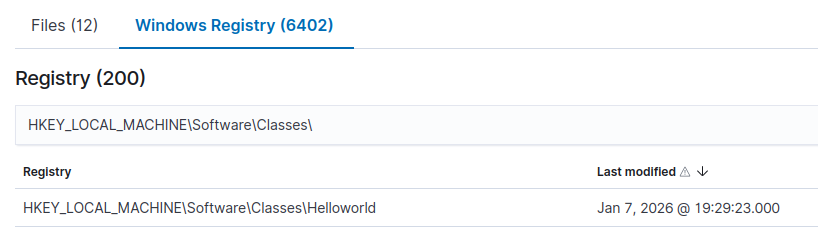

- Identified real-time file creation, modification, and deletion within monitored directories
- Verified immediate alert generation after reducing scan intervals from 12 hours to 60 seconds


Active Response Policies
- Configured active response rules based on defined security events
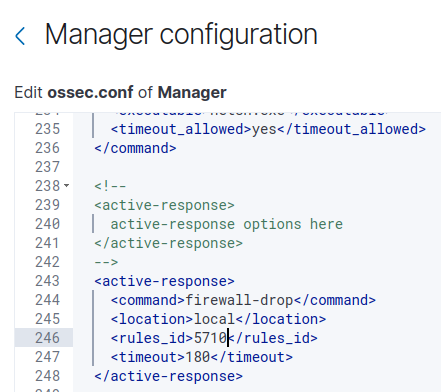
Webhook-Based Alerting
- Verified that alerts were successfully forwarded to an external system via webhook integration
- Ensured notifications triggered appropriately based on monitored events
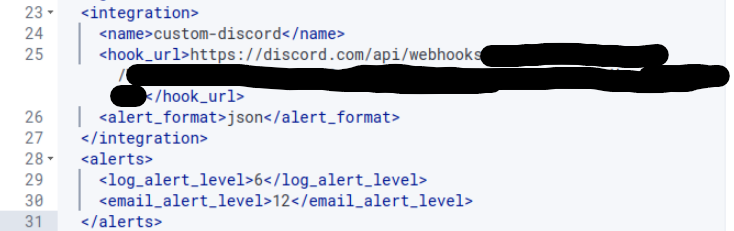
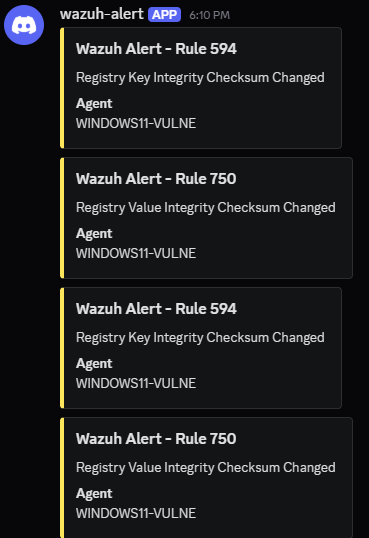
All generated events were successfully forwarded to the Wazuh manager and visualized through the dashboard, demonstrating effective endpoint visibility, and alert correlation.
Documentation:
https://documentation.wazuh.com/current/quickstart.html
https://documentation.wazuh.com/current/compliance/pci-dss/active-response.html
https://learntohomelab.com/docs/HomeLab-Series/EP19_wazuhdiscordalerts/